Agent workflow
How the agent files captures, the research CLI and the skills.
On this page
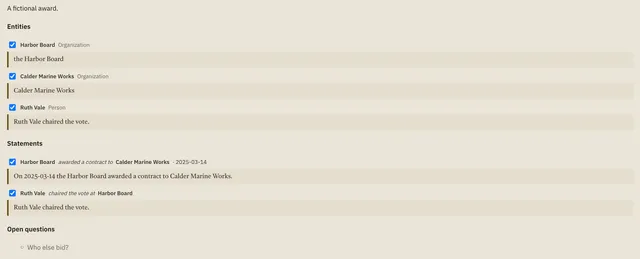
The AI agent is an intake interface. Give it images, notes, article links, transcripts or files, in the desktop app's agent terminal or any Claude Code / Codex session opened in this repository. It captures the source, extracts entities, events and claims, reuses supported existing entity matches, adds source-linked records and graph connections, and files the result into your investigation. You do not need to fill forms, prepare JSON, approve a queue or configure another API key. Specify a case only when it is not clear from context.
The agent returns what it filed and important uncertainty. You can inspect and correct the structured data afterward, then use it for maps, timelines, dossiers, slides and visual stories. Agent-filed is not fact-verified: new records remain Unverified and excluded from publication. Their filing history identifies the agent and does not imply a human reviewed them. Existing entity notes and verification statuses are preserved.
Image observations and transcriptions are labeled as derivatives; the original attachment is retained when its file is accessible. If only a chat rendering is accessible, the agent must report that original bytes were not archived. A visible sign or caption does not prove identity, ownership, location or the truth of an allegation. Video extraction uses only inspected content or actual transcripts; storing a link does not archive a video.
Browser captures from the desktop app§
⌘⇧S in the desktop app saves a selection, image or page as an intake and sends the agent one line naming the intake ID and case. The agent reads the capture with npm run research -- show --intake ID; page content never passes through the terminal. The researcher's note (researcherNote) is an instruction, not evidence. Provenance (captureMeta) records the page, byline, search and surrounding context. Details are in the filing contract.
Driving the browser§
The agent can also work the browser itself: open pages, run searches on every selected engine, read a page as structured data, click, type, scroll, and capture what matters. It goes through the app's own paths, so an agent's search is recorded as a SearchRun, its page opens as visits and its captures as intakes: same case profile, same network route, same provenance, marked as the agent's.
Each case sets its own level in the status bar (⌘⇧B): full: everything above, where a new case starts; gathering: everything that fetches (open, search, follow links, scroll, read, capture) and nothing that acts (no buttons, typing or key presses); off. While the agent may browse, tabs it opened are marked, a bar names what it is doing, and Stop takes the wheel back. Anything the level refuses is offered to you as a one-click prompt.
Only the agent in the app's own terminal can drive the browser; an agent connected from another program over MCP keeps the case tools and gets no browser. Two limits hold at every level: HVNT33 never lets the agent type into password or one-time-code fields, and a paused case (the kill switch) loads nothing.
The agent starts with npm run research -- browse-state to learn whether it may drive and what is open. Commands and the rules the agent works under are in the filing contract.
Persistent structured filing§
Sources, extracted drafts and filing decisions are persisted in ArcadeDB. Filing a batch adds its source record, structured records and supported connections in one transaction, with source-to-record “mentions” links for provenance. Repeated filing requests do not duplicate the batch. Activity is an inspection history, not a mandatory approval step. The staged-review path remains available when you explicitly want a preview.
Captures support up to 60,000 text characters, and each extracted batch up to 50 entities and 75 statements. The agent can split larger material into batches. Text attachments are read locally; binary evidence stays in the vault.
Optional in-app analysis§
The server can also extract a draft itself through OpenAI, as an alternative to the agent: npm run research -- analyze --intake ID, or POST /api/intakes/:id/analyze. It needs an OpenAI API key in .env and a restart:
OPENAI_API_KEY=your-key-here
OPENAI_MODEL=gpt-5.4
Do not paste the key into conversation or commit it. Analysis runs only when asked for, and sends the captured text, source citation, the case's title and question, and up to 200 known entity names and IDs to OpenAI. Binary attachments are not sent. The request uses store: false and Structured Outputs; local validation then checks every excerpt, entity kind, date and reference, which constrains the shape and provenance of the proposals, not their truth. The adapter is tested with a simulated response. There is no button for it in the desktop app yet; the agent terminal is the usual way to extract.
Research CLI§
The agent's execution tool. It needs the running server.
npm run research -- investigations
npm run research -- create-case --title "Investigation title"
npm run research -- context --case INVESTIGATION_ID
npm run research -- snapshot --case INVESTIGATION_ID
npm run research -- capture --case INVESTIGATION_ID --text-file /tmp/source.txt --source-label "Interview notes"
npm run research -- show --intake INTAKE_ID
npm run research -- propose --intake INTAKE_ID --draft-file /tmp/proposal.json
npm run research -- file --intake INTAKE_ID
npm run research -- queue --case INVESTIGATION_ID
npm run research -- export --case INVESTIGATION_ID --scope selected --output data/exports/components.zip
Use file --intake ID --new-entities true when exact-name match candidates are ambiguous and should stay separate. For image-derived notes, pass --source-mode visual-observation during capture. export --scope all creates a private working bundle of all research; export files never overwrite existing paths. HVNT33_URL points the CLI at a server other than localhost:$PORT.
Project skills§
Three repository skills live in .agents/skills/ (Codex) and are linked into .claude/skills/ (Claude Code). CLAUDE.md imports AGENTS.md, so both agents follow the same standing preferences.
- investigation-intake: files chat material and browser captures with source provenance.
- investigation-explore: traces connections, chronology, contradictory accounts and evidence gaps.
- investigation-output: produces source-linked maps, timelines, dossiers and reusable components.
Skills hold instructions, not investigation data. They are selected implicitly; you can also invoke them by name. No plugin or MCP server is required for the CLI-backed workflow. The desktop app also offers a local stdio MCP server when a researcher wants to use a different compatible agent client; its tools retain the same case scope and Unverified-by-default behavior.